Pages

Thursday, March 14, 2013

A HUD is fine too

Mid-march is rather late for the first update of the year, but better late than never! And while my blog updates have slowed down quite a bit, progress on the game hasn't at all.

The first and most immediately obvious change to the game is the UI. It's an area I think a lot of games don't pay too close attention to, especially in the indie and hobbyist communities. Dropping by RPG maker forums, you'll often see games with incredible art, which then have completely default menus (or mostly default with just a windowskin change).

I really don't like that. If you're going to have some part of your game look polished, the entire rest of the game should follow suit, otherwise the unpolished parts really stand out. And really, in an RPG you're interacting with some kind of menu the majority of the time you're playing; out of all other kinds of games, RPGs have the largest reason to pay attention to their user interface.

With that in mind, I've gone over the entirety of the old UI and given it a new look. It's designed to be cleaner and more readable than the previous style, without sacrificing the volume of information that needs to be displayed (which is - admittedly - quite a lot; this is a tactical strategy-RPG after all).


The main menu is the only part I'm not entirely happy with right now. It looks better than before, but it's still missing something. I'll probably have another look at it down the line.


I'm fairly pleased with the rest. It's a consistent look I can maintain for pretty much any menu, it looks quite nice and you can still fit a lot of information in there, since the command menu now only takes up a small strip of space at the top (rather than nearly a third of the screen).


The summary information tabs have also been changed. Now, whenever you select a stat, all the extra information replaces the character's portrait in the middle of the screen, rather than showing up as tooltips.

This gives me a lot of extra space, which I can use for much more detailed descriptions of what each stat actually does. This is one of my favorite changes: it manages to display more information while simultaneously looking cleaner and less cluttered than before.


The game also has a proper options menu now, which fits in with the new menu style.

The main menu wasn't the only part of the UI that changed. I also went over the combat UI and gave that a new look.


Every action you perform now shows a detailed preview of the likely outcome (this used to only work for regular attacks previously, and it wasn't very detailed at all).

Whatever stats you have that can influence the outcome of the action are displayed next to your character's portrait, with the target's corresponding stat shown in that area. In this first screenshot, I'm trying to Trip an opponent, which involves hitting them, then making a Strength check, which is affected by your size relative to the opponent. So in your window you see your BAB, your size modifier and your STR modifier.

This should give you a good idea of both what your overall chance to succeed with any given action is, as well as which stats are contributing to that, and how they compare to your opponents. You can still cancel the action while looking at the preview, so it serves as a nice shortcut so you don't have to constantly keep opening up people's status windows to check what their stat values are (a problem I sometimes ran into with games like Final Fantasy Tactics).

Another part of the menu that's changed is the normal command menu in combat.


I've moved all of the combat over to an AP system. It still works exactly like D&D3.5's action system at its core, but it represents your ability to make actions in terms of points, which I think is far easier to understand than messing about trying to remember whether something is a "Full Round Action" or a "Standard Action", and how many "Actions" you have left at any given point.

I came across this system a while ago, and I think it's a pretty clever abstraction of the D&D action mechanics. Every character starts each turn with 5 AP to spend, and every action now has an AP cost associated with it, which is displayed next to it in the command menu. If you can't take an action, it shows in red, otherwise it shows up in green. And that's pretty much all there is to it. If you're interested in exactly how this translates to D&D's system, you can check out a full description of it here.

I've also added an encounter results window because, well, now that the combat is really starting to take shape and feel more like a real game, the lack of any kind of results window was starting to feel a bit awkward. So now when you finish any combat sequence, you get this:


You can view the description of any items you get in battle before leaving the window, so you don't have to remember to go back to the inventory menu every time you get a new item.

Another feature that I had been meaning to get in for a while now was combat formations. You can now place your party members anywhere on a 5x5 grid and they'll start in that formation in combat.


The direction of the formation is based on which direction your party leader is facing on the map right when combat starts, so you can run into trouble if you're attacked from behind - your entire formation will be backwards! Enemy melee units will definitely take advantage of the situation if you accidentally let your mages start out too close to them.

In addition to that, the combat engine is actually doing a little work behind the scenes to place characters correctly, so you don't have to worry too much about narrow hallways or battles with large number of enemies starting near you. If it can't place you exactly on the tile you want to start on, it's smart enough to figure out where the closest available tile is and put you there instead.

Finally, the last and largest addition to combat: Spells!


Basic spells are now completely working and fully usable in battle (by basic, I mean any spell with fairly simple and straightforward behavior: direct damage, buffs, heals, debuffs and whatnot - more complicated spells, such as Dispel and Magic Circles, still aren't quite working just yet).

I've also been working on the targeting system, which was actually quite a bit more work than anticipated. Let's take our Burning Hands spell from above as an example. If you stick to core D&D rules (which I want to as much as possible), it targets all units in a cone in front of the caster. We're working in 2D, so in this case we'll flatten that into a triangle.

So all the targeting system has to do is draw a triangle and any unit inside of it gets hit. Simple, right?


...Not really. It's actually anything but simple. How exactly do you figure out how to make a triangle out of tiles? And how do you check if there's anyone standing on it? And this is just a simple example, with the triangle facing straight up, towards the tile above the caster. What if you want to rotate it around, like this:


This is where things can get a little tricky. It took me something like 5 different tries at this before I finally got it working exactly the way I wanted it to work. If you're a bit familiar with game development, this is the point where you might say: "that's not hard, just do a triangle-point intersection with the targeting area vs. all of the units".

Well, turns out that doesn't actually work. Or rather, it doesn't work the way I want it to. While units are technically standing in the middle of a tile, they should still get hit if the cone touches any part of their tile. Unless it only scrapes the very edge of the tile (i.e. like the tiles directly to the left and right of the caster on the first screenshot), in which case they shouldn't get hit.


It sounds a bit involved when I actually have to describe it, but if you draw it out on a piece of paper, that's the only way that really makes sense. If you do it any differently, it looks like either too many or too few tiles are getting hit.

So, how do we get this to work? I started by making the actual triangle in real coordinates, rather than clamping it to tiles. Then, the first point is the center of the tile the caster is standing on (let's call this A). If you give the triangle an angle N and a length L, you can find the other two points with:

Bx = A + cos(N / 2) * L
By = A - sin(N / 2) * L
Cx = A + cos(-N / 2) * L
Cy = A - sin(-N / 2) * L

I'm subtracting from the Y coordinates here because Y = 0 is the top-left of the screen in RPG maker, so Y positive is down (whereas on a unit circle, Y positive is up). If you want the triangle to rotate around the caster, you'll want to add that angle of rotation (let's call it R) to the points:

Bx = A + cos(R + (N / 2)) * L
By = A - sin(R + (N / 2)) * L
Cx = A + cos(R - (N / 2)) * L
Cy = A - sin(R - (N / 2)) * L

Once you have all three points, you need to check each tile to see if it's inside the triangle. You can make a fairly trivial optimization here and, instead of checking every tile on the field, just check every tile from [xmin, ymin] to [xmax, ymax], where xmin is the smallest X value between each one of the three points A, B and C (and similarly for ymin, xmax and ymax).


This draws a rectangle that contains the triangle we're using and obviously if any unit is on a tile outside this rectangle, we already know it's also outside the triangle, so we don't even need to bother testing them. This cuts down significantly on the amount of tiles we actually need to test. Now, to figure out whether a tile is actually inside the triangle, I mixed a couple of different approaches.

First of all, I check if the point in the center of the tile is inside the triangle. If it is, then the whole tile is obviously inside the triangle, so that's all we need to check. That will catch most cases. If it's not, however, then we need to check whether it's right on top of the lines that make the triangle. This is where floating point errors can complicate things: if one of the lines that makes a side of the triangle goes roughly, but not exactly through the center of a tile (say it's slightly off-center), the previous check will return false even though the triangle is clearly dividing the tile in two.

So we need to check for that. We also need to check that the triangle isn't only touching the very corner of a tile, but no other parts of it, since that doesn't really count. After a bit of thinking about this I eventually came upon a pretty simple solution:

First, instead of treating tiles as squares, treat them as circles. That way you essentially get rid of the edges and don't have to worry about the triangle only touching the very edge of a tile. Then, just check if any one of the three sides of the triangle crosses any part of the circle that makes the tile. If it does, then the tile is considered to be inside the triangle; otherwise it's outside.


It sounds like a bit of a roundabout way of doing things, but it makes a lot more sense once you draw it out yourself. You can see how it's now pretty trivial to tell whether a tile should be hit by the triangle or not, and there's no cases of it "just barely, but not quite" touching any tiles. If it touches one of the circles at all, that tile is hit.

In case anyone's interested, this is what the code looks like:

And that's all for today! I still have a few things to work on in terms of combat (more complicated spell effects and some class abilities like Turn Undead still haven't been implemented), but it's well on it's way to being feature complete at this point.

I'd go so far as to say most of the hard work has been done on that end. Everything left is tying up loose ends (like the fact that the game does lag a bit when I highlight a really large number of tiles) and adding a bit of polish.

Stay tuned, and until next time~

Monday, November 19, 2012

The Robe and the Wizard Hat


It's been a while since the last update, and quite a lot of things happened, so this will be another rather long update. I really should do these more often so they don't end up so huge.

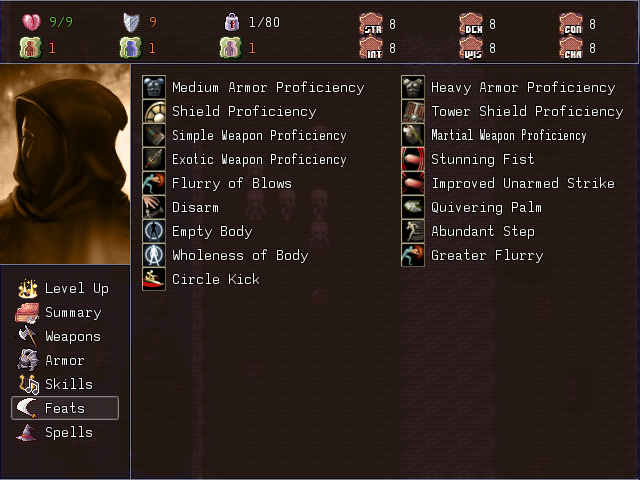
First up is feats. The vast majority of them are done. Out of the 170ish (give or take a few) feats I entered in the game's database when I started working on the feat-selection board earlier in June, all but 9 of them are completely implemented.


I've also added something which slipped my mind before - characters all had races, but I had forgotten to address the issue of racial types and subtypes. Ogres, Tolls and Hill Giants are different races, but they all belong to the Giant type, for example. So I went ahead and implemented that, which also allowed me to complete all of the racial feats, such as the Dwarven Defensive Training feat, and the background feats I've mentioned in earlier updates, which allow you to assign a unique bonus to each character on character creation.

Additionally, all core combat actions (e.g. Bull Rush, Fight Defensively, etc.) are now available, including ones based on class-specific feats:


This means that all melee-centric classes, like Fighter, Barbarian and Monk are essentially finished. The feat menu in particular took some effort to implement correctly. Unlike the other combat menus, it fills itself dynamically on a per-character basis, depending on what feats the given character has available. It also takes into account feats which have a fixed number of uses per day, such as Rage and Stunning Fist.


A few feats have also been renamed to more accurately reflect what they actually do: Called Shot is now Power Shot, One Shot is now True Shot and Manyshot/Greater Manyshot are now Double Shot/Improved Double Shot. I've also tweaked the behaviors of some feats to work a bit differently from their PnP counterparts: Expect Tactician works closer to the Neverwinter Nights 2 version, rather than the D&D3.5e version, while Manyshot is closer to the Pathfinder implementation.

I've also rewritten some of the targeting code to be more flexible: I noticed some inconsistencies with the earlier version due to how distances were being determined.


Now, whenever an ability has a circle-shaped (technically spherical, but we're only concerned with 2D here) effect radius, it's possible to specify to the intersection function whether tiles should have a) their center inside the circle, b) any corner inside the circle or c) all 4 corners inside the circle. This is important because even though the tile system itself purely integer-based, all of the ranges and distance calculations are still performed  in real coordinates internally, to preserve accuracy.

Another area that's had some progress was Status Effects. I improved some of the existing functionality to allow status effects to display their remaining duration along with their icons:


Effects with unlimited duration (e.g. toggled modes, like Power Attack or effects that don't wear off on their own, like Ability Damage) have their duration displayed as "∞". This now happens wherever they're displayed, be it in the status menu or above character panels in combat.


While I was in the right frame of mind to work on graphical improvements to the game, I've also added more feedback to various actions in combat by providing more information in the Combat Log:


Finally, I refactored the way classes were being stored. When I created it, I only had a very small amount of data to store and rarely had to look it up, so it was just kept in 2D arrays. With all the new class-specific behavior that I've been introducing, it became a massive pain to write a 5~10 line block of code every time I wanted to check whether a unit had levels in a given class, or what its class level was. So I rebuilt the whole thing; it's much easier to use now and most checks that used to be O(n^2) and required a several lines of code to make, now are O(n) or constant time and require only one or two lines to be written (and it's much more readable).

Finally, with the vast majority of work on Feats out of the way, I tackled the final major combat-related feature that was missing from the game: Spells!

Originally, I thought this was going to take something on the order of a month to implement because there's just so much to do. Properly implementing spells is something that touches practically every part of the game I've worked on so far: leveling, character creation, the internal actor(and enemy) structures, several menus, several parts of the database, and most of the combat system.

This is where flexible code pays off. Whenever I build a big system - the leveling system, for example - I try to make it flexible enough so I can not only maintain it easily in the future, but also make additions to it without having to rework the whole thing, or copy-paste large sections of code.

Thankfully, it seems I've done a pretty decent job at that; when I went back to some of my older code (some of it going back to about 4 or 5 months ago), it was actually fairly easy and quick to add all the spell behavior into everything - despite the fact that I figured out how exactly I wanted to implement them only recently.


So with that, I've added in all of the remaining core classes in the game, as well as most of their particular intricacies, such as differences between spontaneous and prepared casters.


There's still quite a lot of work to do, of course - even with things moving dramatically faster than I expected, it'll still probably take me another two weeks or so to have all of this properly working. But at the moment, the leveling process is working for all the available classes: you can learn spells, earn spell slots, get caster levels, increase the number of spells per day available, etc.

I've also done most of the work that was necessary in the Spells section of the main menu:


Spells can be viewed, assigned slots and removed (when applicable), as well as having correct behavior for multi-classed characters, which will have several spellbooks; it's perfectly possible to have multiple classes with different progression (e.g. a multiclassed Wizard/Cleric), classes that add progression to the same spellbook (e.g. a Bard/Virtuoso character) and classes which have different spellbooks which are drawn from the same spell list (e.g. Wizards and Sorcerers).

I still have to go back and add proper behavior for spellcasting classes during character creation (which thankfully won't be terribly hard, it's just a special case of the normal leveling process, which I've already completed), spend some time in the database adding all of the spells I plan on having for an Alpha or Demo version of the game (probably only core spells up to 10th caster level - which is still a huge number of spells), and finally add the ability to actually use spells in combat.

I'm glad Thanksgiving is coming up soon - I could use the free time to get more work done! I'm aiming to have most of the scaffolding required for the core aspects of the game done by the end of the year, so I can start working on getting an Alpha version out for people to play. I really want to start working on playable content as soon as possible. With any luck, I'll have something that actually feels like a proper game - rather than a collection of features - out by January next year.

Friday, October 26, 2012

Status Effects, Art and Music

I think I'm finally starting to get back in the groove after my break; I was getting good work done during my last update, but I've really picked up the pace in the last couple of weeks. So here's another status update, and this time it's a big one.

First of all, we now have status effects!


They're visible in the bottom right corner of the main menu, where all the placeholder status icons used to be. As you can see from that screenshot, it's a scrolling window now, meaning you can move the cursor over to it and see however many status effects you're affected by.

Not only that, but I've also re-worked the Summary menu help window to look a little cleaner and function with the newly implemented status effects, giving you some pretty detailed information about what's going on.


This was actually quite a bit of work. If you've ever used RPG Maker, you know it doesn't actually support storing all of this information about status effects anywhere. To get this to work, I've actually implemented a completely different system to handle the game's status effects.

A base class defines all the common features of status effects - applying/reappliyng/removing/etc. , as well as their interface.


Each effect is then represented by a class that inherits that, which can then have whatever behavior I want it to have, and hold whatever information I need it to hold. The fact that I can no longer edit them from VXA's database is a small price for the huge amount of flexibility I get with this.


The following effects were implemented:
  • Flatfooted
  • Prone
  • Fatigued
  • Exhausted
  • Nauseated
  • Asleep
  • Dazed
  • Stunned
  • Fascinated
  • Blinded
  • Deafened
  • Entangled
  • Shaken
  • Panicked
  • Paralyzed
  • Unconcious
  • Dying
  • Dead
  • Haste
  • Slowed
  • Ability Damage (Strength, Constitution, Dexterity, Intelligence, Wisdom and Charisma)
  • Disease (Red Ache, Shakes, Mummy Rot, Mindfire and Cackle Fever)
  • Poisoned (Aranea Venom, Huge Spider Venom, Colossal Spider Venom, Ettercap Venom, Arsenic, Giant Wasp Poison, Phase Spider Venom, Black Lotus Extract, Epic Wyvern Poison, Id Moss, Striped Toadstool, Chaos Mist and Ungol Dust)

These all include most of the various special D&D rules regarding combat behavior while under these effects, such as not being able to Run while Fatigued, and Ability Damage recovering slowly every time you rest.

I haven't implemented every single disease and poison effect in the D&D3.5 SRD because for the most part, I think it's unnecessary (there are dozen and dozens of them). I've included at least one affecting each base ability score, so they all have their own specific purpose. I might add more later if people really think it's necessary, but for now I think a handful of each type should be more than enough.

One other interesting thing to point out, which I realized while developing this whole system for status effects is that in general, the duration for any given effect varies based on how it was caused. Spells, for example, have a duration that's usually based on the caster level of the unit casting it. On top of that, there's other things which can modify it, like Metamagic. So I need some way of saying "by the way, this Haste spell has Extend Spell on it and lasts longer than normal!".

Thankfully, there is an easy way to do this in Ruby, though it requires a little bit of work to setup. Thanks to this post on StackOverflow, I've found out that you can actually model enums as objects in Ruby and use them to represent bitflags. So I can write something like this:


Then all I have to do is pass this around, if say, I want to have a spell with Empower and Maximize on it:


And checking it becomes trivial:


This makes handling all of the various possible ways status effects can behave actually fairly easy. That's about all that's been going on in that front. After wrapping up status effects, I resumed working on the combat system and started filling out all of the previously unimplemented actions. All of the following are now available in combat:


  • Aid Another. Minor change: all Aid actions have been fused into a single action. This means that whenever you "Aid" an ally, they gain both the AC bonus and the attack bonus. Additionally, if they're Asleep or Fascinated, those status effects are removed. This helped me get rid of the clutter from the combat action menu; three different Aid actions was too much.
  • Trip
  • Disarm. Minor change: when a unit is disarmed, their weapon automatically gets returned to their inventory, rather than being dropped on the ground per PnP rules. This means the target can re-equip their weapon after being disarmed, though it will use up their action for that turn.
  • Coup de Grace
  • Feint. Minor change: any unit that attacks the target gets the bonus, not just its user. The effect still disappears as soon as target is hit, regardless of who hit it.
  • Total Defense
  • Run
  • Charge
  • Bull Rush

With status effects available, most of these were fairly straight forward to implement, with a coupe notable exceptions: all the actions that depended on moving in a straight line (so Run, Charge and Bull Rush) required a little more effort.

The problem comes with how I've been handling movement so far. Until now, I've been using a modified version of Dijkstra's Algorithm for path-finding, which works out really well for a tile-based engine like RPG Maker, because a network of tiles can be easily represented as a graph. It's great whenever you need to find the shortest path from A to B, while avoiding any obstacles (i.e. impassable tiles, tiles occupied by enemies, etc.) on the way. It's not very good at straight lines, though.

How would you use it to get the tiles represending a straight line from any given tile to any other tile? The algorithm explores the surrounding tiles in a breadth-first fashion.

The thing about straight lines is that - outside of directly going in one of the 8 directions - it's actually non-trivial to figure out what the "straightest" straight-line path is from any tile to any other tile. So I needed to come up with a way of mapping any straight line, in any direction or angle into actual tiles. Turns out Bresenham's Line Drawing Algorithm is perfect for doing exactly that.


So I wrote a second path-finding algorithm based on that. Given any two tiles, it will find the most optimal way to turn a straight line between those tiles into an actual walk-able path of tiles, then check whether that path can be traversed. The only minor wrinkle in it is that the algorithm was originally created to draw pixels on a screen, and you generally don't care about in what order that happens, so sometimes it gives you the list of points out of order, depending on the slope and direction of the line.

I do very much, however, care about order when walking on tiles in a path, so I've had to make some minor adjustments. Given some fairly simple changes, though, the whole algorithm works out quite well.

Finally, I've made a few changes on the art & design front. First of all, I've simplified a few areas of the game by getting rid of the Grapple mechanics (I think it's unnecessary and most people hardly every use it), the ability to run away from battles (Save often!) and I've halved the range on all ranged weapons.

That last one takes some 'splainin. The thing with RPG Maker that annoys me the most is the incredibly tiny resolution you're limited to. Since I'm essentially making a tile-based SRPG and measuring distances in tiles, this means I have a fixed amount of the game's coordinate space I can ever actually display on screen.

The means that even though some distances make perfect sense in D&D, they're actually really large when you move them to RM. For example: ranged weapons have 3 (roughly) important ranges: 30ft (hand crossbows), 60ft (shortbows) and 100ft (longbows). If you represent each tile as 5x5ft, those turn into ranges of 6, 12 and 20(!) tiles away, respectively.

If you've ever made a map in RMVX or VXA, you know that's a lot of tiles. For the sake of comparison, you can only actually fit a region of 20x15 tiles on screen at any given point. So a longbow would always be able to reach anywhere visible on screen, and then some. That's way too much. I can't ever imagine having combat maps which are big enough for that to actually be relevant. So I've decided to half all of those ranges, bringing them down to 15/30/50 ft - or 3/6/10 tiles, respectively.

I think that's a much more reasonable scale. If you've ever played Final Fantasy Tactics, you'll recall that ranged abilities also had 3 major ranges: 3 tiles (wave fist, most sword skills, other melee ranged abilities), 5~6 tiles (bows, magic) and 8 tiles (guns). I think that's a fairly good scale.

Last, but definitely not least, the game finally has a logo and a title screen, thanks to Archduke on the RPG Maker Web Forums:


Speaking of RMWeb, I've also joined their Game Making Drive. I'll be posting daily updates in the Drive forum thread:


GO TEAM RALPH!

Aaand, that's all folks. Stay tuned for more updates. For now, I'll leave a hint of what I'm working on next:


Monday, October 15, 2012

A Break, more Combat Updates and...Art?

So, in the last couple of months I've taken a bit of time off to sort out various issues that prevented me from having quite enough free time to keep working on the project at the pace I had during the summer.

In the meantime, I took what time I had and decided to use it to go through other games similar to this project and sort of compare notes - see if there's anything I hadn't planned for or had forgotten to address. I did actually end up coming up with quite a lot of extra notes, but I don't want to quite post out here what they are yet until I'm ready to start working on them, which should happen after combat is mostly finished.

That time is mostly over now, thankfully, and I'll be getting back to work on this very soon. In fact, speaking of combat, I have a few extra updates to showcase since the last post I made.

First of all, I've completely overhauled the visuals. It now (hopefully) looks like a proper combat system, rather than a bare-bones tech demo.


There's now a combat log in the bottom right, which displays some basic information about all actions in battle, and the portrait windows should now be easier to read. In addition to cosmetic changes, I've also implemented several of the basic combat mechanics:


Characters can now use most forms of movement, including the basic move action, 5ft steps and the withdraw action. The blue set of tiles displayed is the character's basic movement range, while the yellow set of tiles are the squares they threaten.

Any unit walking within those yellow tiles will trigger an Attack of Opportunity, which has also been fully implemented. Units' threat ranges vary based on what weapons they currently have equipped.

As you can see from the screenshot, attacks have been implemented as well, both in the form of single attacks and full attacks. These all correctly handle two-handed weapons, dual wielding, double weapons and ranged weapons.

I've also implemented a basic targeting system. Each action that can be performed in battle has a particular type of targeting. The targeting system allows actions that target not only single tiles, but area effects in various shapes, such as circles, cones or lines of tiles. This will be more relevant once spells are implemented.

Combat can actually be finished now, so you could say this is the first time the game has an actual proper combat system. Experience is awarded based on the difficulty of each opponent defeated and split between the player's party. Additionally, enemies have their own inventories, and you automatically obtain everything they were carrying at the end of combat.


I've also added a few nice details to make the combat feel smother, such as a damage preview window whenever a player unit targets another unit with a hostile action. This way you have some idea of whether it's worth it to perform a given action before committing to it.

And that's all for now! Next up, I'll be implementing status effects so that actions like bull rushing and tripping are possible, in addition to the obvious applications, such as the ability to poison enemy units or buff allies.

I'm also looking into changing the game's art style into a more grainy, old school 2D western RPG type feel (think Ultima Online), provided I can get the support of an artist willing to put in the work.


I can't say anything for certain about that quite yet, and even if I do make the change, it won't happen for a while, but look forward to further news on that front in the future!

Wednesday, July 25, 2012

Combat Is Hard

Yet another status update! Before I get to that, here's a really quick progress video, showing off what I've been working on since last update - it's been a while since I made a video, so I figured it was time for a new one.


It's a short video, but you can get a glimpse of more or less everything I've been doing recently. You can see the world map in action - I think it looks a lot nicer in action (and with music!) than what you see from the screenshots I had previously posted.

As for the new things:


You may have missed it in the video, but I made a few minor updates to the main summary menu. The most important additions are:

  • There now are icons in the header for stats that weren't visible before. The staff with the red X on it is your Arcane Spell Failure chance (from wearing armor), the blue dashing guy is your Initiative score and the black icon on the bottom-right of the header represents your Armor Check Penalty (used when you're wearing heavy armor and try to use skills like Hide or Move Silently).
  • All of the new icons have tooltips, indicating where the final number comes from, in terms of your stats and equipment
  • Some of the old stats which didn't have tooltips now do. Notably, you can now see how your equipment is contributing to your carrying weight, and where your HP value comes from. If you pay attention to the video, the HP tooltip displays how much HP you're getting from your class. If you take more levels in that class or in a different class, the tooltip will display how much of your total HP comes from each level you've taken in all classes you've ever taken a level in. 
I'm a big fan of giving players all the (relevant) information you can, so I think these are all pretty nice additions to the summary menu.


Another small but important addition is loading screens. RPG Maker games are usually so small and have such tiny resources compared to a standard 3D PC game that loading screens aren't actually necessary, but I find that - if done well - they're actually pretty nice to have just to add more visual flavor to the game.

I'm not entirely sure I like the font color on the LOADING/SAVING text, but I'm pretty happy with everything else about how these turned out. I'll be using various D&D related images throughout the game. 

Which image you see is usually random, though I've also added code in to allow me to display a specific image (or a random image from a specific set of images), so that you'll generally end up seeing images related to what you're actually doing in the game. When you rest in town you'll see a different image from when you rest in an inn, and those will be different from what you see when you fast travel or enter a map that's part of a particularly important plot point. I think that when used properly, these can add a lot to the atmosphere of the game.


Finally - the big elephant in the room - the combat system! Well. Almost-combat-system. Since you technically can't actually have any combat yet.

This is where the bulk of the work has been going in during the last couple weeks for me. The UI is intentionally completely bare-bones for now: I'm still implementing most of how the combat works; I can worry about what it looks like later (I'd go so far as to say the visuals are the easy part).

What you see in the video is pretty much all I have at the moment. There's a turn-based system running managing combat, and you can see the turn order (which is determined by every combatant making an actual d20 initiative roll at the start of combat) by looking at the portraits in the top-left of the screen.

Most of the commands in that menu don't actually do anything yet; I just put them there to get a feel for how the menu layout will eventually look like once it's done, and as a reminder for everything I want to eventually get working in the game. Every single one of those commands will eventually be implemented and work the way you expect them to if you're familiar with what they usually do in D&D.

The AP bar doesn't mean anything right now, though it eventually will. I'm planning on using it as a visual representation of what you've actually done so far that turn. For example: in D&D you can move up to twice per turn (or move once then act once). So after moving once, your bar will be half full.

The three little axes on the bottom-right display are placeholders for, in order: whether the unit is an ally or an enemy (eventually will be some kind of blue or red icon, depending on who the unit is), how many free actions the unit can make per round and how many Attacks of Opportunity the unit can make this round.

There's a few interesting things I put in the system that I'm not really able to show off in a video yet, like the ability for enemies to have random names (picked from a list of several hundred). They also have their own inventories, which determine loot at the end of combat - so if you see an enemy wielding a Great Sword of Kitty Murdering + 4, you will actually get it as a reward once you kill him in a fight. If an enemy starts combat with a bunch of potions or spell scrolls, you can get them as loot if you kill it before they get a chance to use them. And so on.

That's about all I have so far. There's a placeholder for a status window (which will look something like the summary window in the main menu, but you'll be able to see them for enemies too), though I doesn't have much inside it right now, and there's some enemy AI (though all it does at the moment is "Think" for 4~5 seconds, then end its turn without doing anything).

The groundwork for combat is all there, now I just have to keep adding to it. I can see why people don't build custom combat systems that are too different from RPG Maker's default very often. I still have a very long way to go before this is proper D&D combat and it's already taken me a couple weeks of work and 7 scripts which together total about 3000 lines of code.

That's all for now. I'll be working on combat for a while, posting more updates every now and then, when I make progress significant enough to show off in screenshots or a video.

Thursday, July 12, 2012

EVO 2012!

It's been a little too long since my last status update, but here it is: better late than never, I suppose.

In case you're wondering, the reason for the delay is that this past weekend was EVO 2012 - the largest fighting game tournament in the world, held every year in Las Vegas - which I attended. I took some time off RPG Maker-related things for the last couple weeks to get a little bit of practice before going.


Now that that's over (it was incredible, by the way, you should watch some of the matches if you haven't done so already - KOFXIII and Marvel 3 in particular) - I can get back to work.

Despite the rather long break, I have actually gotten quite a bit done since my last update. The first major thing is that the game now has a Day/Night system.


Now, as simple and common as such a system might seem, it will actually have a significant effect on how you play the game. I don't want to give away too much just yet, but: in addition to the time of day changing, and the tint of the screen changing in outside areas, which actual day it is will matter as well.

The game will keep track of how many (in-game) days have passed since you started the game, and various events will happen differently depending on how soon or how late you trigger them. This will be a major influence in how the game's main storyline unfolds, and ultimately how the game ends. That's all I'm going to say about that for now!

Another thing you may have noticed is that in addition to a clock, the main menu now also has a World Map option. From there you can view the game's map, as well as fast-travel between locations you've visited before.


You can move the cursor around to highlight your destination, while moving it to the edges of the screen scrolls the map (which is actually quite large). For those without the patience to find their destinations' exact locations on the map (or for those times when you've simply forgotten), you can instead press X to open a quick menu displaying all your available destinations in a list.


Another new addition to the main menu is weapons and armor. The weapons & armor menus are now actually functioning menus, rather than placeholders, as they used to be.


All base (i.e.: non-magical) equipment functions as expected of a D&D 3.5 game, including the ability to Dual Wield smaller weapons, use larger weapons in two hands and Double Weapons having two separate attacks.

All equipment is unique, so you can have several different pieces of Chain Mail, for example, each with different extra bonuses. You can also press X while highlighting any piece of equipment to view a description window detailing its properties:


Another nifty feature is that the equipment you use will actually affect your character sprite's appearance in-game. So even if you have two characters which look exactly the same after you've finished customizing your appearance when you start the game, they will still end up looking different if you have, say, one wearing scale mail and the other wearing a helmet and a set of full plate mail:


Finally, I've completely reworked how I'm representing player attributes in-game. Initially, I was using the standard RPG method of assigning players some base value of, say, Strength, then in a separate structure I'd hold any enhancement bonuses they might have from, say, equipment or abilities.

When I started actually implementing equipment I realized how this didn't quite fit the way D&D handles attributes: there's an unlimited number of different bonuses that can be applied to any attribute, and you have to keep track of what bonus is of what type, because bonuses of the same type don't stack (with a couple rare exceptions).

With that in mind, I completely reworked how I model player stats. Now, every attribute is actually a hash table, which itself contains an array of values of a given type of bonus. The largest value is always used, but all values are stored, in addition to some meta-information on what's responsible for that bonus in the first place.

I like this because it's a much more faithful representation of how D&D attribute bonuses work, but also because it allows me to add new cool features like this:


That's what the status menu looks like (and has looked like for a while). Before, all you could do was look at it. Now, you can hit the confirm key and move the cursor into that window, like so:


And you'll get to highlight the core stats displayed in that window. Each stat you highlight has an associated tooltip which displays everything that's contributing to that stat's final value. In this case, your total AC is 17 - 10 from the base value every character has, and another 7 from your equipped armor and shield.


Bonuses are displayed in green, while penalties are displayed in red. In addition to bonuses from equipment, you can also see modifiers for certain stats, like your character's saving throws (which are modified by certain other core attributes).

And that's all I have for now!

Next on the schedule, I've actually decided to put off some of the things I detailed in my previous post (such as autosaves and minimaps), since I don't think they're terribly important to get done just yet.

Instead, I'm going to start tackling what is probably the most important part of the game: the combat system. It is, after all, the biggest part of the core gameplay and I haven't even started working on it yet. I've also gotten all the major requirements for some basic combat done (i.e. characters have equipment, stats, feats, etc. - they're more or less ready for combat in every way outside of having an actual combat system).

That's probably going to take a while, but once I have that done, this will feel a lot more like a proper game, I think. Then I can start working on the smaller things - like the minimaps, the autosaves and the quest system.